Planting
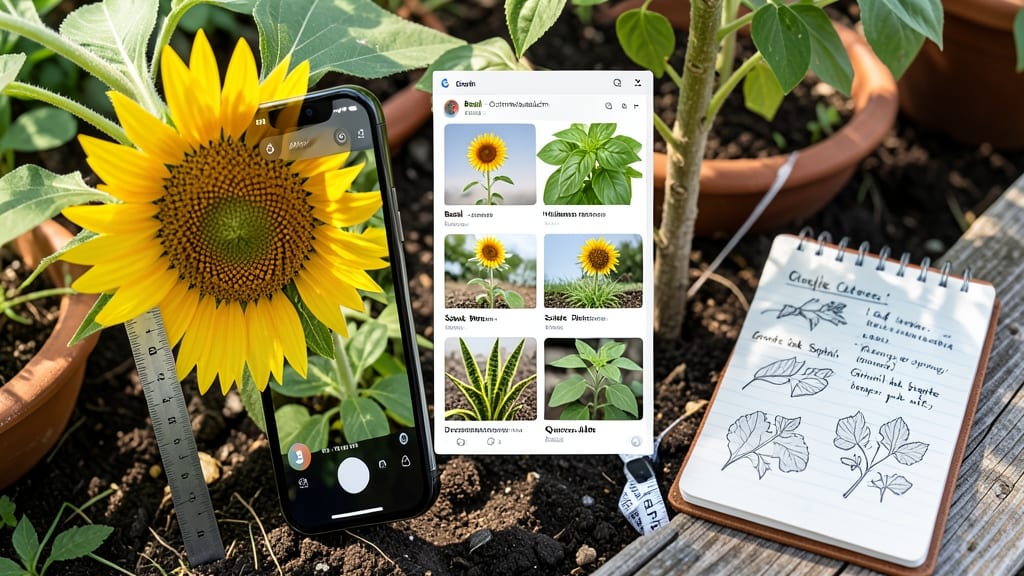
Stumped by how to identify a plant using Google? The app can solve your leafy mystery in seconds—no green thumb required. 🌿 I’ve used Google Lens to ID everything from stray weeds to prized perennials, and the process is simpler than you’d think.
Just snap a clear photo, and let the app do the rest.
You’ll need a smartphone with Google Lens (built into the Google app) or a computer with internet access. For tricky cases, try PlantNet or iNaturalist—both offer crowdsourced plant databases that handle fuzzy photos better than generic searches.
Most identifications happen in under 10 seconds, though rare species might take a few minutes.
The results often include care tips, regional growing zones, and even pest warnings—no extra research needed. I’ve caught invasive species early and saved struggling plants by knowing exactly what they needed. The only downside? Overly common plants (like dandelions) sometimes return generic matches.
For best results, photograph leaves, flowers, and stems together in natural light. Avoid blurry shots or close-ups of just one feature—Google needs context. Once you’ve got the ID, cross-check with local gardening forums to confirm before treating or transplanting.
📚 In This Guide
- What you need
- Instructions
- Tips and common mistakes
- Wrapping up and next steps
What you need
- ● Smartphone or tablet – Any modern device with a decent camera (10MP or higher recommended for clarity). 📸
- ● Stable internet connection – Wi-Fi or mobile data (4G/5G preferred for faster searches). 🌐
- ● Google app or Google Lens – Pre-installed on most Android devices; iOS users can download Google Lens from the App Store.
- ● Macro lens or close-up camera mode – Captures fine details like leaf veins, flower structures, or tiny hairs. 🔍
- ● Natural light source – Avoid harsh shadows; shoot near a window or outdoors on a cloudy day. ☀️
- ● Notebook or plant journal – For sketching unique features (e.g., leaf shape, bark texture) if tech fails. ✏️
- ● Plant identification apps (backup) – Examples: PlantNet, PictureThis, or iNaturalist. 🌱
- ● Basic understanding of plant parts (leaves, flowers, stems, bark) to describe features accurately. 🌿
- ● Patience for multiple angles—Google needs clear, varied shots! 📷
- ● Curiosity to note location/climate (e.g., "grows in Zone 7, partial shade"). 🌎
Quick plant ID with Google: Step-by-Step visual guide
Here's how I identify plants in seconds—no botany degree required.
📱 Step 1: Capture High-Quality Photos of Key Features
Open your phone's camera and snap three clear photos from different angles. Focus first on the leaves—their shape, edges, and vein patterns are the most telling. For flowers, photograph the entire bloom plus a close-up of the stamens and pistils. I avoid shady areas; backlighting makes details pop and eliminates shadows that obscure textures.
Include a reference object in one shot—a coin or ruler—to show scale. Many apps struggle with tiny or massive plants when they lack perspective. If the plant has fruit or bark, add those too. I always take a fourth photo of the habit—how the plant grows (upright, sprawling, bushy)—since growth patterns narrow down possibilities dramatically.
🔍 Step 2: Use Google Lens for Instant Visual Matching
Open the Google app on your phone and tap the Lens icon (camera with a magnifying glass). Select your best leaf or flower photo and wait for the app to process. Google Lens will often return instant results with the plant's name, family, and even care tips. If it doesn't work immediately, try a different photo—sometimes a close-up of flowers or a full-body shot triggers better matches.
I’ve found that young, healthy leaves work best—diseased or damaged foliage confuses the algorithm. If the results seem off, tap "Search the web" instead of relying solely on Lens. Sometimes a quick Google Images search yields more accurate matches from gardening forums or plant databases.
🌿 Step 3: Cross-Check with Plant Identification Apps
Download free apps like PlantNet, PictureThis, or iNaturalist for backup verification. Upload your photos and compare results across platforms—no single app is perfect. I notice that PlantNet excels with flowers, while PictureThis often identifies foliage better. Take screenshots of all results and check for consistency in the names and descriptions.
Pay attention to the scientific name (Latin) alongside common names—this helps avoid confusion with lookalikes. For example, "snapdragon" and "foxglove" can be mistaken for each other, but their Latin names (Antirrhinum vs. Digitalis) clarify the distinction instantly. If apps disagree, focus on the most detailed description—usually the one mentioning leaf arrangement or flower structure.
📚 Step 4: Verify with Reliable Online Resources
Visit trusted sites like the USDA Plants Database, Missouri Botanical Garden’s PlantFinder, or Wikipedia’s plant category pages. Type in the names from your apps and cross-reference leaf shape, flower structure, and habitat. I always check the "Look-Alikes" section—many plants have deceptive similarities. For example, poison ivy and Virginia creeper are often confused, but their leaflet arrangements differ.
If the plant is in your region, search for local gardening forums or university extension service pages. They often include region-specific guides that generic apps miss. Bookmark a few of these sites for future reference—I keep a folder labeled "Plant ID Backup" in my browser.
💡 Step 5: Narrow Down with Environmental Clues
Note where the plant grows—sunny meadows, shady forests, or urban sidewalks—and whether it’s annual, perennial, or invasive. These clues help eliminate mismatches. For instance, a dandelion (Taraxacum officinale) thrives in disturbed soil, while cat’s ear (Hypochaeris radicata) prefers grassy areas. I jot down observations like "grows in cracks of pavement" or "blooms only in summer" to refine searches.
If you’re still unsure, post your photos on Reddit’s r/whatsthisplant or Facebook gardening groups. Gardeners often spot details apps miss. Include your location and habitat notes—this helps experts narrow it down faster. I’ve had plants identified within hours this way, even when apps failed.
Tips & tricks for faster plant identification
These pro-level shortcuts will help you go from curious gardener to plant detective in no time.
Lighting is Everything: Natural daylight is your best friend—avoid cloudy days or indoor lighting when photographing plants. I always shoot between 10 AM and 2 PM when sunlight is brightest. For indoor plants, position them near a south-facing window for even lighting. The goal is to eliminate harsh shadows that obscure leaf veins and flower details. If you're forced to shoot indoors, use a ring light or even a well-lit lamp with a white diffuser to mimic natural conditions.
Focus on the Right Details: Step 1 emphasizes leaves, but don't overlook the leaf arrangement—whether they grow in whorls, opposite pairs, or alternate patterns. This is often the key differentiator apps miss. For example, mint has square stems with opposite leaves, while basil has round stems with alternating leaves. I keep a small notebook nearby to jot down these observations while I'm photographing, as they're easy to forget later.
App Strategy for Maximum Accuracy: When using Google Lens in Step 2, combine it with another app like PlantNet for cross-verification. I've found that uploading the same photo to both apps often reveals discrepancies that become obvious when compared side-by-side. Pay special attention to the flower structure descriptions—terms like "actinomorphic" (radially symmetrical) versus "zygomorphic" (bilaterally symmetrical) can reveal a lot about a plant's family. These details often get lost in basic app results.
Habitat Notes Save Time: In Step 5, I've learned that noting the plant's soil type (sandy, clay, loamy) can dramatically narrow down possibilities. For instance, blueberry bushes require acidic soil, while lavender thrives in well-draining, alkaline conditions. I keep a simple chart on my phone with common plants and their preferred soil pH levels. This extra step often helps me eliminate 70% of incorrect matches before I even consult an app.
Pro Tips for Identify A Plant Using Google
- These pro-level shortcuts will help you go from curious gardener to plant detective in no time.
- Lighting is Everything: Natural daylight is your best friend—avoid cloudy days or indoor lighting when photographing plants.
- Focus on the Right Details: Step 1 emphasizes leaves, but don't overlook the leaf arrangement—whether they grow in whorls, opposite pairs, or alternate patterns.
Frequently asked questions
Got questions about identifying plants with Google? You’re not alone! Here are some of the most common concerns—and their quick solutions.
Can I identify a plant just from a photo, or do I need more details?
Google Lens and apps like PlantNet or PictureThis can often ID plants from photos alone, but close-ups (especially of leaves, flowers, or bark) improve accuracy. If the plant is rare or similar to others, include details like leaf shape, growth pattern, or location for better results.
How long does it take to get an accurate ID?
Most tools deliver results in seconds! However, if the plant is uncommon or poorly lit, it may take a few minutes to cross-reference databases. For tricky cases, try uploading to forums like Reddit’s r/whatsthisplant for expert opinions.
What if Google can’t identify my plant? What’s next?
No match? Try these fixes:
- Improve lighting: Shoot in natural light, avoiding shadows.
- Focus on details: Zoom in on flowers, seeds, or stems.
- Describe it: Use keywords like “spiky leaves” or “white blooms” in a search.
- Check local resources: Contact a botanical garden or university extension office.
Will Google work for plants outside my country?
Yes! Google Lens and apps like iNaturalist support global plant databases. Just ensure you’re using the correct regional settings in your app. For exotic species, combine photos with location tags (e.g., “tropical vine, Hawaii”) for precise matches.
Is it safe to upload plant photos online?
Generally yes, but be cautious with sensitive data. Avoid uploading photos of rare or invasive species to public forums—opt for trusted platforms like Google Lens (which doesn’t store images) or private gardening groups. When in doubt, delete photos after use.
Wrapping up and next steps
Identifying plants with Google is simpler than you think—just snap a photo, ask the right questions, and let technology do the rest! Whether you're a curious gardener or a plant enthusiast, this method saves time and spares your plants from mystery.
Now that you’re equipped with these tips, why not try it today? Grab your phone, head outdoors, and start exploring the green world around you. Happy plant hunting! 🌱